Grow your Garden
Problem Statement
A concept and prototype for an AR experience that helps users preview plants in their space and access simple care guidance.
UX Case Study - AR Mobile Concept & Prototype
Planning a garden is overwhelming! People struggle to visualize plants in their space and often lack clear care information.
Design Solution
Role
Duration
Tools
Create an intuitive AR experience that helps people preview plants, explore options, and understand plant care essentials.
|
|
AR Flows
Wireframes
Testing
Prototyping
UX/UI Designer
4 weeks
Design Process
User-Centered Design Process
DISCOVER
DEFINE
IDEATE
DESIGN
TEST
Discover
To understand the space, I reviewed common gardening challenges and identified user frustrations around plant care, planning, and choosing suitable plants. This helped shape the initial direction for AR support and feature exploration.
Define
Focused on understanding what people need from gardening apps to design features that are genuinely useful.
Target Users
Planet enthusiasts looking for an easier way to plan & care for home greenery.
Key User Insights
Leads to
AR visualization
Simplified care reminders
Visual-first UI
Planning tools
Insight
Visual uncertainty
Care overwhelm
Aesthetics matter
Inspiration → action gap
View User Persona ▾
Feature Mapping
Ideate
Translating user needs into features, flows, and early AR concepts.
Early feature mapping clarified which core interactions would shape the AR experience.
Scan Plant
Retrieve Info
Save to Favourites
Preview plants & accessories
Scroll through accessories
View plant growth stages
AR Visualization
Seasonal suggestions
Lighting needs
Care tips
Saved Plants
Room selection
Care reminders
Plant Information
Plant Identification
Organization Tools
Task Flows
Visualize a Plant using AR
Defined steps users take to preview plants in their space using AR mode
Home
Page
AR
Preview
Explore
Page
Press Search Icon
Plant
Page
Press Snake Plant
Snake Plant
Page
Press Camera
Icon
Mapped the flow for quick plant identification and saving plants for later care
Home
Page
Press Camera
Icon
Scan a Plant and Save to Favourites
AR
Preview
Press Heart
Favourites
Page
Press Heart on
Nav Bar
View
Plant
Wireframes
Translating concepts into wireframes, UI, and early AR interactions.
Lo-fi wireframes helped define structure before moving into visual design and AR UI.
Design
High-Fidelity Design
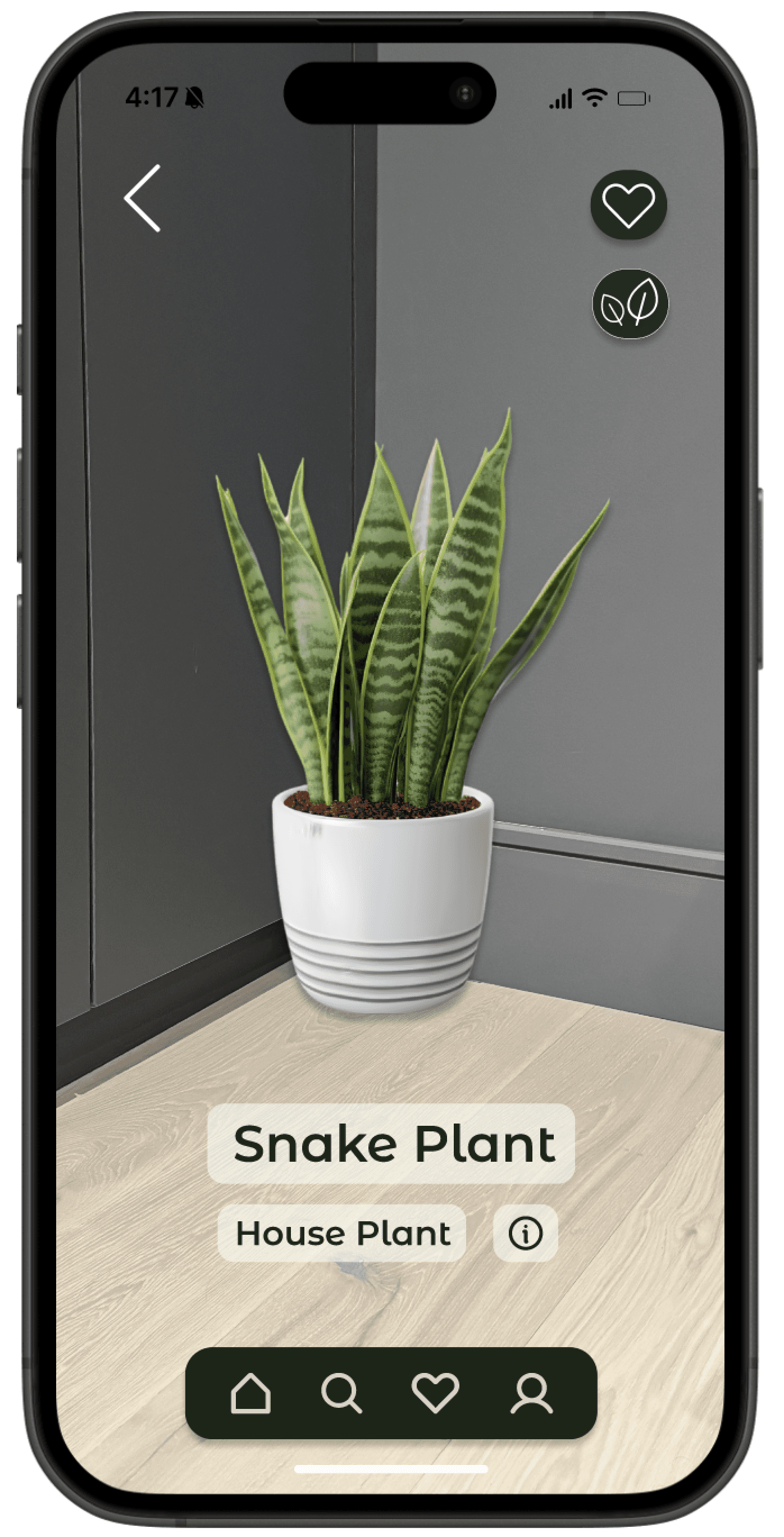
Focus: ‘Visualize a Plant using AR’ flow, the core interaction that defines the app’s value.
AR Preview UI
Identified core interaction points within AR mode to keep the experience clear.
Add plant to favourites
Users can quickly save a plant they like, explore how it grows over time, or read care tips.
All while seeing it in their space through AR.
{
View plant growth stages
View plant info & care details
Plant Name
Category Tag
Usability Testing
Evaluated the “Visualize a Plant using AR” flow to understand clarity, navigation, and overall ease of use.
Evaluating the experience through user testing to uncover areas for improvement.
Test
Participants:
3
Identify whether users could navigate AR mode smoothly and complete the preview task without confusion.
Find a plant
Navigate to its details page
Access AR preview mode
View the plant in their space
What participants were asked to do:
Goal:
Participants expected a more direct way to access AR from the home screen
The search and explore flow felt familiar and intuitive
The plant details page was clear and easy to follow
Users expected stronger guidance toward plant discovery before reaching AR
Participants were able to complete the AR preview task quickly and confidently
Key Insights
Overall, the participants were able to complete the AR preview task efficiently, but expected a more prominent AR entry point earlier in the flow.
What I Would Do Differently
Reflection
Relocate the AR entry point to the navigation bar for clearer access
Test alternative layouts for plant discovery to reduce reliance on search
What I Would Explore Next
Add more detailed AR placement cues (e.g shadows, plane detection)
Explore additional plant interactions, like rotating or resizing the plant in AR
What I Learned
Learned how essential clear entry points are in AR-focused flows
Saw how familiar UI patterns improve user confidence with new features
Evelyn Martinez · Product Designer
Let’s connect! →